RAK RUI Web Serial Firmware Uploader
Setup
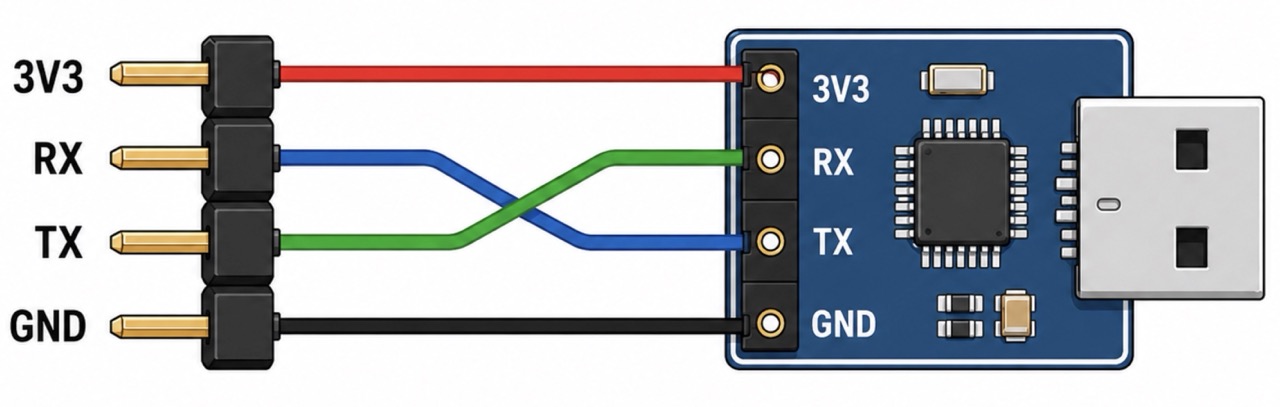
Connect 3V3 to 3V3, RX to TX, TX to RX, and GND to GND. Then click Select Serial Port and choose the USB serial device from the popup to connect.
1) Serial Monitor
Advanced Serial Settings
2) Firmware Upload (RAK RUI)
More Info
This uploader is based on the original Python implementation: tools/uploader_ymodem.py. It uses the same YMODEM-based process and is compatible with the RAK RUI3 bootloader. You can obtain the firmware file (like firmware.bin) from the manufacturer.
Security and Privacy
Local-only by design: this page does not use fetch, XHR, WebSocket, analytics, or other outbound network APIs. Serial data stays between your browser and the selected USB serial port. The page also uses a strict Content Security Policy that blocks network connections.
The only optional external navigation is the source-code link in the info section, and it opens only if you click it.
You can read the open source code and verify it.
Browser requirements: Chromium-based browser with Web Serial support. Open from localhost or HTTPS.